
May 2026 | Qual IT Managed IT | Architectural Firms | Ransomware & Business Continuity
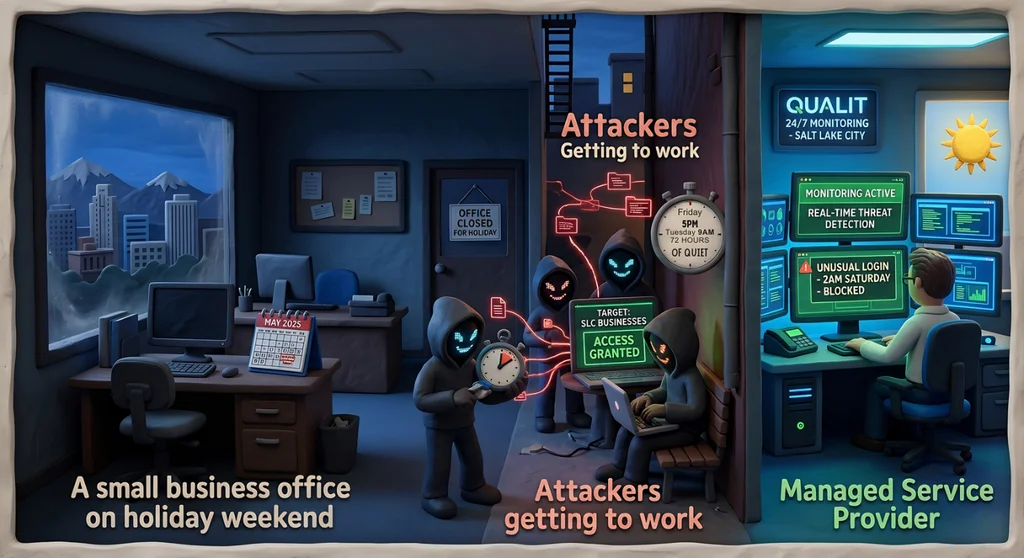
Your firm does not stop caring about project deadlines on Friday afternoon. But your security posture might. For many architectural firms, the weekend means a skeleton crew or no staff at all — and attackers know it. Ransomware groups have made a deliberate strategy of timing their attacks to coincide with holidays, long weekends, and the hours between Friday evening and Tuesday morning. By the time anyone notices something is wrong, the damage is done and the ransom demand is waiting. If your firm's Revit models, AutoCAD drawings, and BIM 360-linked project files are sitting unmonitored over a long weekend, you have a meaningful window of undetected exposure.
The Research Behind the Friday Attack Pattern
A 2025 Semperis report found that 52% of ransomware attacks occur on holidays or weekends. The logic is simple from an attacker's perspective: incident response times are slower, IT contacts are unavailable, and the attack has more time to propagate before anyone acts. The report also found that 78% of organizations reduce their security staffing on holidays — which means the window of low detection is predictable and reliable.
For architectural firms, the 72-hour window between Friday afternoon and Tuesday morning is particularly dangerous. That period may span a long weekend holiday, encompass a client presentation deadline, and coincide with rendering workstations running overnight jobs unattended — all while no one is actively monitoring the network.
What Ransomware Looks Like in an Architectural Environment
Ransomware in an architectural firm does not look like a movie scene. It looks like a Monday morning where Revit models will not open. Project files in BIM 360 or Autodesk Docs return errors. AutoCAD drawings in the shared network drive are replaced with encrypted files. The Deltek Ajera database that tracks project hours and billing is inaccessible. And there is a ransom note waiting.
Rendering workstations — which often run overnight with large Lumion or V-Ray jobs — are particularly attractive targets. They are high-performance machines left unattended for hours, often connected to the firm's core network, and rarely monitored with the same scrutiny as primary workstations. A successful attack that begins on a rendering workstation Friday night can spread to the firm's file server and project collaboration environment before the weekend is over.
The Reactive Model Fails Architectural Firms
Most small and mid-size architectural firms operate on a reactive IT model: something breaks, someone calls. That model works tolerably well for routine issues. It fails catastrophically for ransomware, because the attack is already complete before anyone knows it happened. By the time the Monday morning call goes out, the encryption has run, the backups may have been targeted, and the negotiation clock has started.
The reactive model is especially mismatched to the nature of architectural firm operations. Project teams are often working across multiple active projects simultaneously, with deadlines staggered across the calendar. Losing access to design files for even 24-48 hours during a critical phase — permit submissions, construction document production, client presentation prep — can have consequences that ripple well beyond the IT incident.
The Proactive Model: 24/7 Monitoring and Defined Response
Continuous Monitoring Does Not Require In-House Staff
The alternative to reactive IT is not hiring a full-time security operations team — it is partnering with a managed IT provider that provides 24/7 monitoring as part of the service. Continuous monitoring means that if ransomware begins executing on a rendering workstation at 11pm on Saturday, an alert fires immediately, automated containment can isolate the affected machine from the network, and a response process begins before the attack can spread to the rest of the firm's environment.
For architectural firms, this kind of monitoring should cover file servers where design files are stored, workstations including rendering machines, BIM 360 and Autodesk Docs integration points, and backup systems — because attackers routinely target backups first.
Tested, Offsite Backups Are Not Optional
A backup that has not been tested is not a backup — it is a hope. Architectural firms need backups that are automated, versioned (so you can restore to a point before the attack), stored offsite or in a cloud environment that is not accessible from the main network, and verified regularly. If your backup strategy is 'we have an external drive that someone plugs in on Fridays,' a Friday-night ransomware attack will hit both your live data and your backup in the same window.
Incident Response: Know the Plan Before You Need It
Every architectural firm should have a documented incident response plan that answers: Who do we call first? What do we do with active project deadlines? Do we have client notification obligations? What is the recovery time objective for getting design files back online? These questions are much easier to answer when the environment is calm than when a ransom note is on the screen. Working through them in advance with an IT partner — even at a basic level — dramatically improves outcomes when an incident occurs.
Your Design Work Is the Business — Protect It Accordingly
The projects in your BIM 360 environment, the models in Revit, the drawings in AutoCAD — that is the intellectual and commercial core of your firm. Treating those assets with the same care as the physical building your firm helped design means making sure they are monitored, backed up, and protected even when no one is in the office.
We work with Salt Lake City architectural firms to protect design files and keep project workflows running — including through the weekends and holidays when the risk is highest.
Schedule a free discovery call with Qual IT to assess your firm's ransomware readiness.
Frequently Asked Questions
Q: Our rendering workstations run overnight jobs. Does that make them a bigger risk for ransomware?
Yes. Unattended machines running overnight are an attractive entry point for ransomware because they have extended windows of no human oversight. Make sure rendering workstations are on the same monitoring coverage as primary workstations, segment them from your core file server where possible, and apply the same patching and endpoint protection standards you use for the rest of the firm's environment.
Q: We have a shared drive where all our design files live. Is that safe if it is not cloud-connected?
On-premise file servers are not inherently safer than cloud storage — in many cases they are more vulnerable because they rely entirely on your perimeter security and local backup practices. A ransomware attack that reaches your shared drive can encrypt every Revit model and AutoCAD file on it. The key protections are: regular tested backups stored separately from the live environment, endpoint protection on all machines that connect to the drive, and network segmentation to limit lateral movement.
Q: We had a ransomware incident two years ago and recovered. Do we need to keep worrying about it?
Yes. A prior incident and recovery is evidence that you were targeted and that your environment was vulnerable at the time. Ransomware groups share target lists and often return to organizations they have successfully attacked before. The fact that you recovered means your data had value. The question is whether the vulnerabilities that allowed the initial attack have been fully remediated — not just the immediate infection, but the underlying entry point and lateral movement paths. A security assessment is the right way to answer that question definitively.


