September 2026 | BIM IT Support Salt Lake City | Productivity & Efficiency | Proactive IT
If you run an architectural firm, you're always looking for ways to give your designers and architects more time to design.
New software, AI tools and productivity systems all promise to help. But the Salt Lake City firms that run with the fewest interruptions usually have one thing in common: better habits — often reinforced by the right IT support behind the scenes.
The biggest time-savers aren't the ones getting the most attention. They're the routines that prevent small problems from becoming expensive distractions during a deadline push. As year-end deliverables approach, it's a good time to revisit five habits that keep studios productive, reduce friction and avoid unnecessary fire drills.
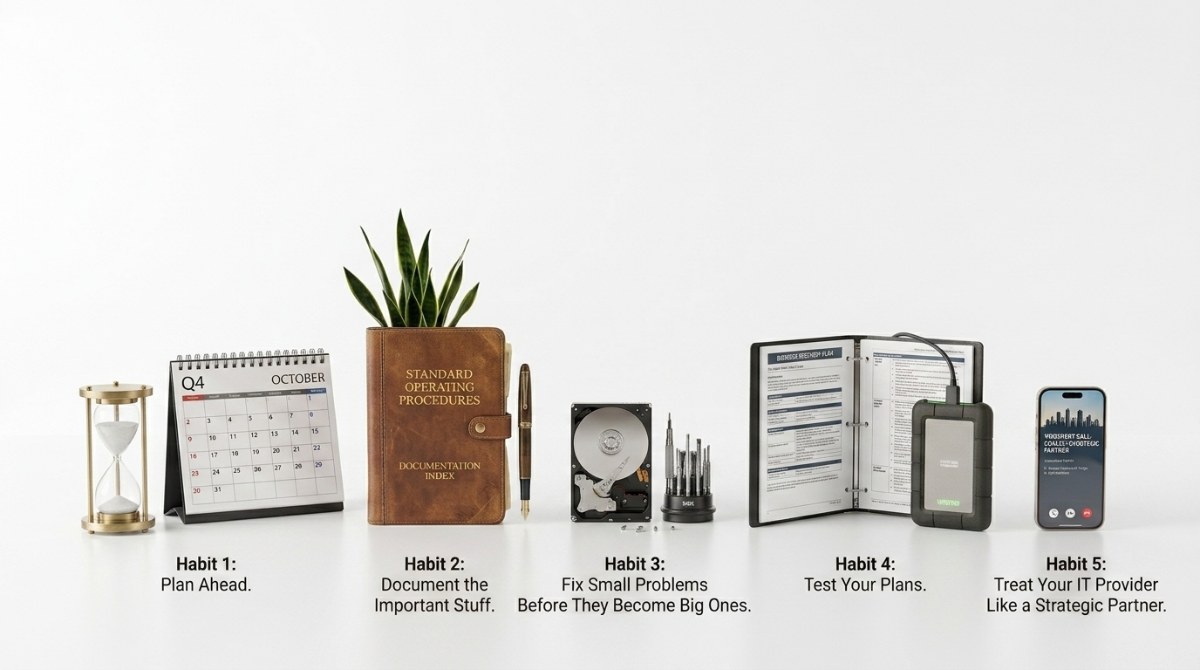
Habit 1: Plan Ahead Instead of Playing Catch-Up
If you wait until the end of the quarter to evaluate what's working, you're already playing catch-up.
Well-run firms set aside time to review project priorities, discuss potential roadblocks — an upcoming rendering push, a model that's outgrowing its workstation, a consultant onboarding onto BIM 360 — and prepare for what's next. Those conversations don't need to be long, but they do need to happen consistently.
When you make planning a habit, you're less likely to spend time reacting to surprises and more likely to stay focused on your projects. A little planning today prevents a lot of scrambling the week a submittal is due.
Habit 2: Document the Important Stuff
If your firm depends on one person remembering how something works, you've created a single point of failure — and studios are full of them.
The classic example: the plotting and publishing workflow that only one person knows. The sheet setup, the export settings, the way the drawing set gets assembled and issued — if that person is out sick the day a permit set is due, the whole deliverable stalls. The same goes for Revit template standards, shared parameters, vendor contacts and BIM 360 project setup.
Processes, standards and responsibilities should be easy to find, understand and share. When information lives in one person's head, work slows down. When it's documented, your designers and architects move forward with confidence. The less your team has to guess, the more time they spend designing.
Habit 3: Fix Small Problems Before They Become Big Ones
Every studio has a list of minor frustrations people have learned to work around.
Maybe it's the workstation that takes 20 minutes to open a Revit model. Maybe it's the sync-to-central that fails once a day, or the render node everyone avoids. Because those issues aren't urgent, they get pushed aside — but do the math on that slow workstation: 20 minutes, several times a day, at billable design rates. That's real money leaking out of every project.
The most efficient firms take a different approach. They address small problems while they're still manageable, rather than waiting until they cause larger disruptions. This is exactly what proactive IT support is built for — catching the failing drive under the project server, the aging graphics card, the unpatched software before it costs your team a day of production.
Small issues may seem harmless, but they rarely stay that way.
Habit 4: Test Your Plans Instead of Making Assumptions
It's easy to make assumptions when everything seems to be working.
"Our project files are backed up."
"The team knows what to do."
"We'll figure it out."
Resilient firms replace assumptions with confidence. They verify that backups of design files and render archives actually exist — and, more importantly, that a large Revit model actually restores intact, with links and worksets behaving. A backup you've never tested is a hope, not a plan. Deadline pressure is exactly what makes backup testing easy to deprioritize, and exactly why it matters.
September is National Preparedness Month — a good reminder that preparedness isn't only for families and communities. It's a smart studio habit, too. The time you spend testing a restore is usually far less than the time you'd spend rebuilding a model from the last issued set.
Habit 5: Treat Your IT Provider Like a Strategic Partner
If the only time you talk to your IT provider is when something breaks, you're missing opportunities to prevent problems in the first place.
The most successful firms have regular conversations about project pipeline, workstation lifecycle, storage growth as models and renderings pile up, and security around design IP. That allows technology decisions to support the practice instead of reacting to problems after they happen.
A strong partner providing BIM IT support in Salt Lake City reinforces the habits that keep your studio running efficiently — offering guidance, planning and support long before an issue turns into an interruption. The best technology relationships prevent problems, not just solve them.
Frequently Asked Questions
Do you offer IT support for architectural firms and design studios in Salt Lake City?
Yes. Qual IT provides IT support for architectural firms in Salt Lake City, including support for Revit, AutoCAD, SketchUp and ArchiCAD environments, BIM 360 administration, high-performance storage and workstations for rendering, and backup and cybersecurity built around design work. We work with Salt Lake City architectural firms to protect design files and keep project workflows running.
How does proactive IT support save architectural firms time?
Proactive IT support catches issues before they cause downtime: monitoring workstation and server health, patching software between deadline pushes, verifying backups of design files and BIM models, and closing security gaps. Instead of losing billable hours to slow machines and failed syncs, your designers and architects stay focused on actual design work.
How quickly can Qual IT respond to issues in Salt Lake City?
As a local Salt Lake City IT support company, Qual IT provides responsive help desk support and proactive monitoring designed to resolve most issues before they interrupt your studio's day.
Small Habits Make a Big Difference
The firms that save the most time consistently build habits that reduce friction, improve visibility and keep projects moving forward.
As you prepare for Q4 deliverables, ask yourself which of these habits your studio is already doing well — and which ones deserve more attention before deadline season gets busier.
If building a healthy, resilient technology foundation for your practice is on that list, schedule a 10-minute discovery call with Qual IT. We'll help you identify opportunities for improvement and make sure your firm is ready for whatever the rest of the year brings. Book your discovery call here.